Seven practical techniques to cut token waste without making your coding agent dumber.
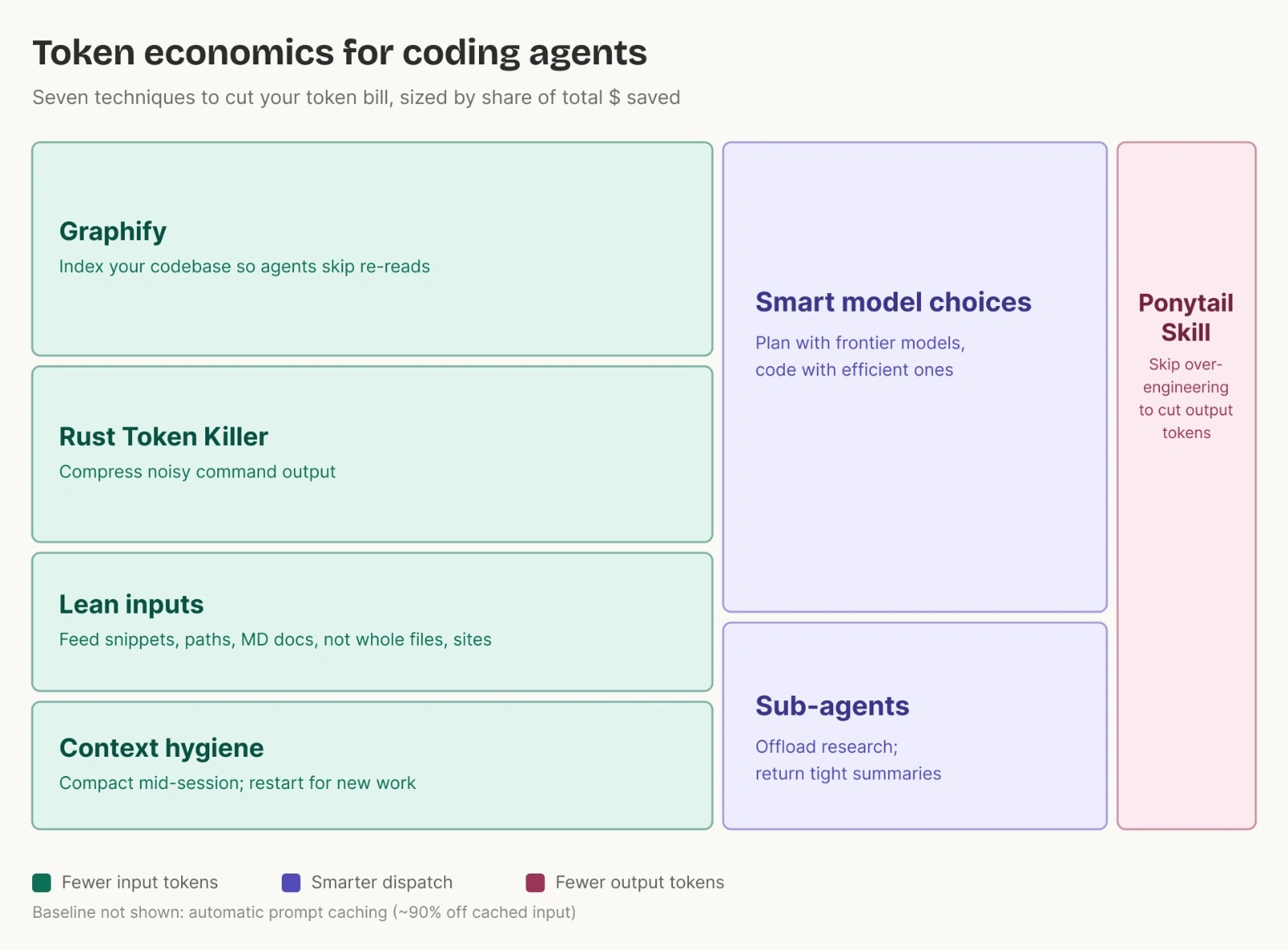
The expensive part of an agent session is rarely one prompt. It is the context that gets carried forward: stale logs, old messages, broad tool arguments and noisy tool output, and long replies from earlier turns. Every new turn can make the model pay attention to that whole history again.
Token optimization is not "make the agent know less." It is "put the right information in the active context, route work to the right model, and ask for the smallest useful output."
The diagram above separates token savings into three levers: reduce input, route work better, and reduce output. Dispatch is not a billing category; it is the choice of model, reasoning effort, tool, or sub-agent workflow. Good dispatch cuts waste on both input and output.
This post follows the structure in the token-economics diagram:
- Fewer input tokens: Graphify, Rust Token Killer, lean inputs, and context hygiene.
- Smarter dispatch: smart model choices and sub-agents.
- Fewer output tokens: Ponytail Skill.
Context windows, prompt caching, model controls, and usage fields differ by product and model. Treat the tactics below as a framework, then check the latest docs for your agent and provider.
The Token Budget You Actually Control
What Are Tokens?
Tokens are the small chunks of text that an LLM reads and writes. As a rough English estimate, 1 token is about 4 characters or 0.75 words. "Hello world" is about 2 tokens. A 500-line file might be 4,000-6,000 tokens depending on language, formatting, and comments.
Tokenization is model-specific. The same text can split differently across model families. See this tokenizer playground for a better understanding of how OpenAI models split text into tokens.
Why Reducing Tokens Matters
- Cost: LLM providers often separate pricing and usage fields across input, cached input, output, and reasoning tokens. The exact categories vary by provider and model.
- Focus: Context is a finite attention budget. Low-signal files, logs, and tool output compete with the facts the agent actually needs.
- Window pressure: A model can only consider a finite token window. Once it fills, older detail must be summarized, dropped, or moved into a new session.
How Coding Agents Spend Tokens
Prompt Caching Is Not Cleanup
Prompt caching can reduce cost and latency for repeated stable prefixes such as system instructions, tool definitions, and repo rules like AGENTS.md. It does not make stale context useful. A cached 40-message thread can still distract the model if it is full of old guesses, noisy command output, and unrelated diffs.
Keep durable context stable. Put the current task, latest diff, failing test, and target file slices near the dynamic end of the conversation. At task boundaries, compact or start fresh.
1. Input: Stop Overfeeding the Agent
Input-token work is about feeding the agent less junk. This is where the largest practical savings usually live because coding agents repeatedly re-read context, files, docs, and terminal output.
Tip 1: Graphify Your Codebase
What It Is
Graphify turns a folder of code, docs, Markdown, screenshots, diagrams, images, or PDFs with the PDF extra installed into a queryable knowledge graph. Instead of asking the agent to re-open every relevant file whenever it needs to understand "how auth works" or "where the retry policy lives," you give it a compact graph and pull raw code only when the next decision needs it.
Graphify produces graph.html, GRAPH_REPORT.md, graph.json, and related outputs under graphify-out/. It also tags graph edges as EXTRACTED, INFERRED, or AMBIGUOUS, so the agent can tell source-backed facts from guesses.
Why It Saves Tokens
- Raw files are expensive to re-read.
- Graphify stores the extracted project graph in graph.json. GRAPH_REPORT.md carries human-facing highlights such as key concepts, surprising connections, and suggested questions.
- The agent can query the graph first, then read only the source files it still needs.
- In Graphify's token benchmark, one 52-file mixed corpus used 71.5x fewer tokens than reading the raw files.
When To Use
- Monorepos or unfamiliar brownfield systems.
- Mixed corpora: code plus docs, PDFs, screenshots, schemas, or architecture notes.
- Recurring architecture questions where the same areas get reread: auth, billing, permissions, onboarding, data pipelines, or deployment flow.
How To Use It
Install the CLI and register it for Codex:
pipx install graphifyy also works. Plain pip install graphifyy can work too, but it may require PATH setup, especially on Mac or Windows. For PDF extraction, install the PDF extra:
Build an initial graph:
Update an existing graph for a target folder:
Before vs After
Before
After
Commit graph artifacts when your team agrees they are safe to share. Keep caches, secrets, and generated files listed in ignore rules out of the repo.
Tip 2: Rust Token Killer For Noisy Command Output
What It Is
RTK, also called Rust Token Killer, is a CLI proxy that filters and compresses command output before it reaches the LLM context window. It targets the kind of output coding agents constantly produce: git status, git diff, test runners, linters, package managers, Docker, Kubernetes, and logs.
A terminal log becomes input on the next model turn. A 1,200-line test log is not "free" just because it came from a tool.
Why It Saves Tokens
- Test runners and build tools repeat a lot of text the agent does not need.
- RTK applies filtering, grouping, truncation, and deduplication per command type.
- RTK trims common dev-command output by 60-90%. In one 30-minute Claude Code run on a medium TypeScript/Rust repo, it cuts the log from about 118k raw tokens to about 23.9k. Actual savings vary by project and by the commands run.
When To Use
- Outputs from commonly used scripts are long.
- Test, build, Docker, Kubernetes, or package-manager commands bury the one useful failure under banners, repeated warnings, and passing cases.
- You want compact default output but still need raw logs available for failures.
How To Use It
With Homebrew:
Choose the init command for your agent:
Use it explicitly when needed:
Before vs After
Before
After
Never hide the only evidence. Keep raw output recoverable for failures, security warnings, changed files, stack traces, and diff hunks that a reviewer still needs.
Tip 3: Lean Inputs
What It Is
Lean inputs mean giving the model pointers, snippets, paths, symbols, and Markdown instead of whole files, folders, or websites by default.
Think of it as:
The agent should first find the relevant code, then open only the line ranges that matter.
Why It Saves Tokens
- Markdown is often much smaller than HTML source for agent-readable docs because conversion can omit nav, CSS, script tags, and wrapper markup. Prefer it when the source provides Markdown, and measure when token count matters.
- Cloudflare measured one page at 16,180 tokens as HTML and 3,150 tokens as Markdown, about an 80% reduction.
- Search results and line ranges keep the model focused on the question.
Where It Helps
- Debugging.
- Editing one feature path inside a large monorepo.
- Reviewing logs or stack traces.
- Working inside a repo you don't know yet.
Tip 4: Context Hygiene
What It Is
Context hygiene is the habit of keeping the active session small, relevant, and stable. It includes compaction, fresh sessions, lean rules files, ignore-rule files, and pruning unused tools or skills.
The core idea is simple: maximize signal per token. Cut stale context, repeated prompts, broad file dumps, noisy tools, and verbose output. Keep the context that reduces engineering risk.
Why It Saves Tokens
- The conversation grows every turn.
- Always-on rules and tool schemas often get sent repeatedly. Billing may vary when cache hits apply.
- Stale context distracts the model and can make it solve yesterday's problem.
- Compaction replaces a long history with a short state summary.
Where It Helps
- A thread is getting very big.
- You are switching tasks.
- You just finished a planning phase and are moving into implementation.
- You keep correcting the same convention every session.
How To Apply It
Compact at natural breaks. In Codex, use /compact to summarize the visible conversation:
In Claude Code, you can give compaction instructions inline:
Start fresh for unrelated work:
Keep rules files short:
Codex exposes /compact for summarizing visible conversation and /clear for starting a fresh chat in the same CLI session. Claude Code's cost guide uses /compact Focus on code samples and API usage as an example of giving compaction instructions, and recommends /clear between unrelated tasks.
In Codex, tool_output_token_limit sets a token budget for storing individual tool outputs in history. Use /status to review session configuration, token usage, and remaining context capacity, /mcp to review configured MCP servers, and /skills to view installed skills. Use these controls as backstops, not as replacements for good input hygiene.
Keep The Always-On Stuff Small
Always-on context is sent repeatedly. Depending on the provider, it is billed at full or cached-input rates, and it still competes for the model's attention before your actual task starts.
- Rules files: keep AGENTS.md, CLAUDE.md, and similar files focused on project facts the agent actually misses: stack, commands, conventions, and hard boundaries.
- Skills: Codex initially includes a bounded list of available skills so it can choose one, then reads the full skill only after selection. Claude Code can also hide or restrict skills. Keep descriptions scoped and disable skills you do not want the model to consider.
- MCP servers: tool catalogs still cost attention, even when schemas are deferred. Prefer a plain CLI when it is simpler than enabling a broad MCP server, and disable servers you are not using for the task.
Turn Repeated Prompts Into Scripts
If you ask the agent to perform the same deterministic workflow again and again, it should become a script, slash command, hook, or small skill.
Stay In The Loop
Your review is still one of the best token controls. A vague prompt can create three rounds of wrong work, and each correction replays the accumulated context.
2. Dispatch: Route Work to the Right Lane
Dispatch means sending each part of the job to the right lane. Updating a copied label across three files can run on an efficient model with low effort. Designing a multi-service auth migration with rollback, data contract, and security-risk analysis should use a stronger model and higher reasoning.
Tip 5: Smart Model Choices
What It Is
Smart model choice means routing by phase:
- Use stronger frontier models, such as Claude Opus or GPT-class models where appropriate, and higher reasoning effort for planning, architecture, hard debugging, migrations, production-risk analysis, and deep reviews. For OpenAI/Codex, higher effort usually means high or xhigh; provider labels vary.
- Use a lower-cost model (Kimi, GLM) for implementation, mechanical edits, docs, test updates, cleanup, and read-only sub-agent scans.
- Escalate when the lower-cost lane gets stuck, changes architecture, or cannot produce evidence.
Why It Saves Tokens
- Reasoning tokens are output tokens; higher effort can generate more reasoning.
- A costly model is worth it when judgment prevents rework.
- File edits don't need the same reasoning budget as architecture.
Where It Helps
- Multi-step work where planning and implementation are at different difficulty levels.
- Code reviews where the first pass needs breadth and the final pass needs care.
- Large refactors where a strong model should design the plan, then a lower-cost lane can apply repetitive changes.
How To Use It
Use this phase split:
For Codex, check the current config reference before changing settings. Useful knobs include:
Codex also exposes tool_output_token_limit for setting a numeric budget on individual tool outputs stored in history. Claude Code exposes /model, /effort, model aliases, and effort frontmatter for skills and sub-agents. These controls vary by model and API, so verify supported values before relying on them in a team guide.
Changing stable prompt-prefix inputs, such as rules, tool definitions, or large repeated context, may reduce prompt-cache hits. Switch model or reasoning effort when the task's quality, speed, or cost tradeoff is worth it.
Before vs After
Before
After
Compare the model plus the agent runtime, tools, and instructions, not the model alone. A lower-cost model with good repo context and tight instructions can outperform a stronger model fed a messy prompt.
Tip 6: Sub-Agents
What It Is
A sub-agent is a separate agent thread or isolated context used for a bounded piece of work: research, file exploration, test triage, migration inventory, log analysis, or second-opinion review.
The important part is isolation. The sub-agent can grep broadly, read many files, read noisy logs, and test a theory without dumping all of that intermediate context into the main conversation. The main thread gets the distilled result: files, line ranges, findings, commands worth running, and open questions.
Codex sub-agent workflows run as separate agent threads that can be inspected with /agent. Claude Code sub-agents can also run with their own model, tools, effort, and even worktree isolation. In both cases, the main point is to keep the main conversation focused on requirements, decisions, and final implementation.
Why It Saves Tokens
- Broad exploration happens outside the main thread, so old searches and false starts do not keep replaying in the main context.
- Read-heavy workers can often use smaller, lower-cost, faster models where available, such as gpt-5.4-mini in Codex or haiku/sonnet in Claude Code, with lower effort when the task is straightforward.
- The main agent can spend its stronger model budget on decisions and final review.
- The handoff can be much smaller than the raw work: findings, file paths, exact lines, commands run, and unresolved questions.
Sub-agents do not magically reduce total tokens. Each worker has its own model and tool work. Use them when isolation, parallelism, or lower-cost worker paths offset the extra orchestration cost.
Where They Help
- Codebase mapping: "Find where billing retries are implemented and return only the relevant files and line ranges."
- Large diff review: one worker checks security, one checks test gaps, one checks maintainability.
- Log triage: a worker reads a long failure log and returns the first failing test, stack frame, and likely owner.
- Migration inventory: a worker scans for all call sites, config keys, or deprecated API usage before the main agent edits.
- Independent hypotheses: when there are three plausible causes and each can be investigated separately.
- Second opinion: before a risky production change, send a read-only reviewer through the diff.
Avoid sub-agents for one-file edits, tiny questions, or write-heavy parallel work where agents are likely to collide in the same files.
How To Use It
Give each sub-agent a bounded brief:
For persistent custom workers, set the model and reasoning/effort in the worker configuration when your host supports it. In Codex, custom agent configuration can set model and model_reasoning_effort. In Claude Code, sub-agent configuration supports fields such as model, tools, effort, maxTurns, and isolation.
The noisy exploration remains in the worker threads unless you choose to inspect it. The main thread carries the decision-ready summary.
3. Output: Make the Agent Generate Less Waste
Output-token work is about making the model generate less unnecessary prose, reasoning, and code. That matters because output tokens are often priced higher than input tokens.
Tip 7: Ponytail Skill
What It Is
Ponytail is an open-source skill that pushes a coding agent toward the smallest solution that actually satisfies the task. This is not code golf. It frames the rule as writing only what the task needs while keeping validation, data-loss handling, security, and accessibility intact.
The idea is simple. Before inventing a new abstraction, the agent checks whether the codebase already has it, whether the standard library or native platform can do it, and whether an installed dependency already covers it. Only then does it write new code.
Why It Saves Tokens
- Less generated code means fewer output tokens.
- Less generated prose means fewer output tokens.
- Smaller diffs cost fewer future review tokens.
- Smaller solutions reduce maintenance and regression surface.
Ponytail's benchmark uses real Claude Code sessions against a FastAPI + React repo: about 54% less code, 22% fewer tokens, 20% lower cost, and 27% faster in that benchmark. Treat those as results from one project, not a universal promise.
When To Use
- The agent keeps over-engineering.
- The task can likely use platform features, stdlib, or existing code.
- You want a code-first answer with minimal explanation.
- You are doing CRUD, UI controls, glue code, small backend endpoints, or cleanup.
Don't use it to suppress necessary design thinking, security checks, error handling, accessibility, or migration safety.
How To Use It
For Codex:
Then open /plugins, select the Ponytail marketplace, and install Ponytail. Open /hooks, review its two lifecycle hooks, trust them only if you accept what they do, and start a new thread. For the Codex desktop app, restart the app after installing so it picks up the plugin.
For Claude Code, send these as two separate prompts:
Before vs After
Before
After
The point is not that every feature is one line. The point is to try the simplest valid solution before generating new code.
Use a clear quality boundary with Ponytail: "minimal solution, but keep validation, auth checks, accessibility, observability, tests, and rollback safety."
Quick Setup Check: Settings Worth Checking
The seven tips above are the main framework. This section is just a short setup check before a long agent session. Every coding-agent tool exposes cost controls differently. Before a long session, check these four things:
- context or usage meter
- model and reasoning-effort setting
- tool-output or terminal-output limits
- always-on rules, skills, and connected tools
The names change by product, but the idea stays the same: keep the active context small, route hard work to stronger models, and avoid sending noisy output back into the chat.
Where Not To Cut
Saving tokens does not mean starving the agent. Spend tokens when extra context lowers real engineering risk.
- Greenfield architecture: interfaces, data shape, auth, deployment, rollback, and ADRs deserve careful context.
- Brownfield readiness: existing behavior, adjacent flows, scheduled jobs, contracts, and logs are part of the work.
- Refactoring safety: characterization tests and behavior maps are less costly than broken production behavior.
- Security and compliance: auth, PII, audit logs, data retention, and secrets handling need enough context.
- Second-opinion review: a fresh reviewer costs tokens, but can catch mistakes the implementation session normalized.
Cut noisy context. Keep the context the agent needs to make the right call.
Learn More
For more advanced agentic coding topics, you can read our playbook here:



 When to Hire CodeWalnut?


